Trial Music Lesson for Ages 2–3
First musical discoveries
For a toddler and an adult to explore together
There is no need to complete every section in one sitting.
 Download the complete lesson PDF
 Before you begin: free materials and preparation
All learning materials are included in this lesson and are available to download free of charge. You will find the Time to Learn! story and coloring book, the hands picture, red and blue note-symbol flashcards, and the English Song–Chant starting on Do in the relevant sections. There is no need to find or buy them separately.
We will show you each step, even if you have never played the piano. Try one activity yourself first, then let your child watch and join in. There is no need to complete the whole lesson in one sitting.
Prepare as you explore
You can begin by looking at the book on screen. When you reach coloring or flashcard activities, print the pages you need. An adult cuts out the cards.
You will also need pencils, paper or cardboard, and scissors for the adult.
Which device to use
The Soft Mozart demo works on computers, tablets, and smartphones. Choose a device that suits you. A larger screen makes the graphics and details easier to see.
For activities on real piano keys, connect a digital piano or keyboard by MIDI to the device running the demo.
Choose a section. Select its title to open the activity.
1. Teaching approach: your role in your child’s learning
Try the activity yourself first. Let your child watch and join in.
 Why this matters
You do not need to test whether your child has talent or “musical ability” before starting. We create conditions in which children can learn to look, listen, focus, and act.
In every part of the lesson, from exploring the story to playing the keys, your child takes part: noticing a symbol, hearing a sound, and responding with movement or voice. Gradually, they learn to sustain attention and connect separate impressions into a meaningful action.
Your role is to spark interest through your own example, allow time for an attempt, and help when your child asks. You do not need a musical education: learn the activities alongside your child. Stay nearby without hovering or intervening in every action.
What to do
- Explore the activity yourself first. Try playing, singing, or laying out the cards. Let your child see your interest.
- Give your child a chance to watch and join in. Speak calmly and keep instructions short.
- Offer activities in small amounts when your child is interested. Your child’s interest determines how long you spend and when you return, rather than a fixed schedule.
- Watch your child: if they are tired, turn away, or become upset, stop. You can return to the activity later.
- Notice specific actions: “You found the key yourself!” or “You waited for the butterfly!”
- Record early attempts and activities on video. Keep dates and results: this is the story of your child’s first steps.
What not to do
- Do not try to secure attention through persuasion, repeated questioning, or demands to “Sit down and listen.”
- Do not hurry your child or perform an action for them while they are still trying to learn it.
- Do not insist on completing every activity in one sitting or immediately repeating a success.
- Do not compare your child with others or judge their abilities from a first attempt.
- Do not turn learning into a performance for visitors or the camera. Do not ask for repeated takes to make a perfect video.
A common difficulty
“I prepared everything, but my child does not want to join in.”
Begin yourself: open the book, lay out the cards, or try playing. Give your child time to become interested. If today they only watch, do not force them to participate.
 What to notice
Your child comes closer to watch, listens, reaches for a card, tries pressing a key, or returns to an activity. Notice what they do independently and what help they need.
Keep a record of the beginning
In our experience, parents sometimes notice changes so quickly that they wish they had recorded the earliest attempts. Record ordinary moments, including pauses and difficulties. Later, these will help you see how far your child has come. You do not have to publish the recordings.
The guiding principle
Your interest invites your child to join in. Your patience gives them room to learn.
2. Kingdom of Tune: the story, book, and Guess Key
Open the book and begin exploring it yourself.
What is the Kingdom of Tune?
What is the Kingdom of Tune?
In music, sounds relate to one another. In major and minor, they have particular roles and relationships. The Kingdom of Tune conveys these relationships through storybook characters and events.
Your child is discovering how the language of music works, rather than simply meeting separate notes. This lays a foundation for tonal hearing: hearing relationships between sounds. These foundations later support playing melodies by ear, finding harmonies to accompany them, and transposing music into other keys.
The Time to Learn! book
This is a book to look at, read, and color together. Pay particular attention to the note symbols: they connect the story’s pages and characters with the keyboard.
Open the book and begin exploring it yourself. When your child joins you, show the pictures and read. Notice the symbols on the doors: “Here is Door,” and “Here is Rain.”
Do not set a quota of “one page a day.” Look, read, and color for as long as your child is interested. Return to a favorite page or explore further.
From the book to the game

Open Guess Key. Remember its name and icon so you can find it in the program.
Your child meets familiar symbols and characters in the game. Now they can find the corresponding key, press it, and hear its sound.
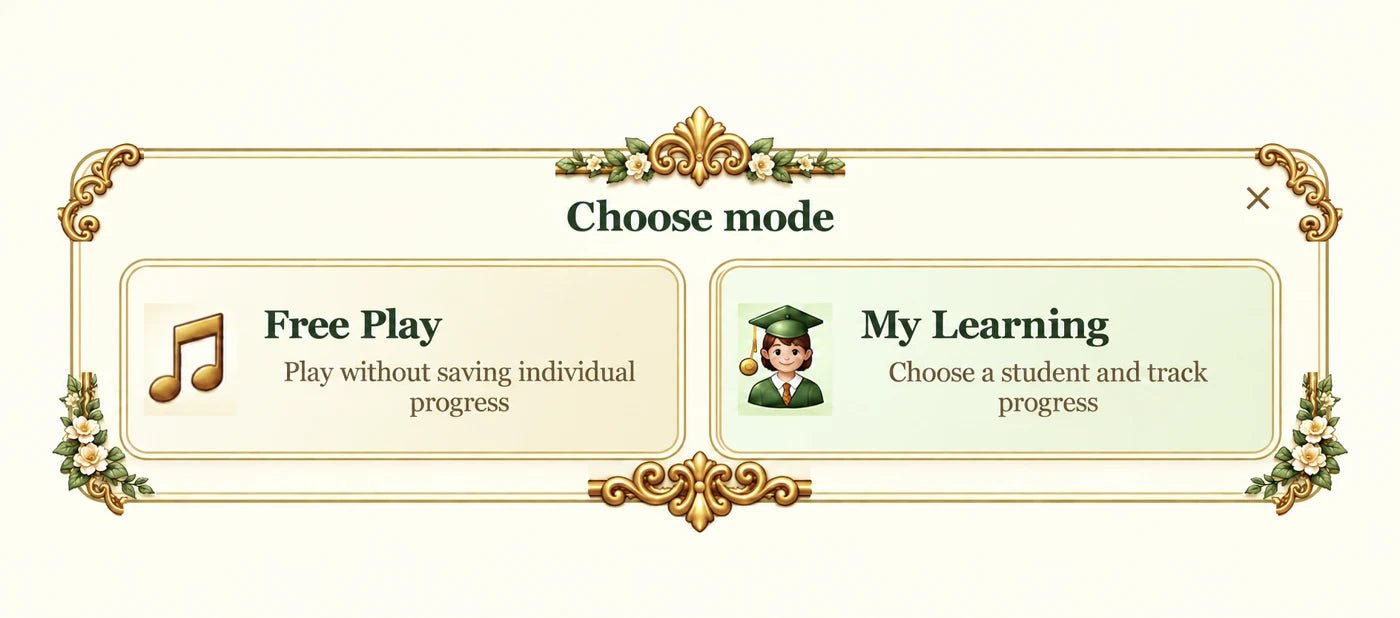
Before the first game: choose a mode
Free Play — try the program without saving individual progress.
My Learning — use your own name and track results. Select your name for your practice and your child’s name for their attempts.
Getting started with Guess Key
- Explore the game yourself first, under your own name or in Free Play. Open F1 Help if needed.
- For your child’s turn, select their name if you want to save results.
- Begin with the first level. In the demo, a game lasts 45 seconds.
- Let your child look at the symbol, find the corresponding key, and press it themselves. You can stay nearby and name familiar pictures.
 Do not press the keys for your child.
The game’s algorithm responds to the player’s actions. If you press keys for your child, the program records your actions as their result. The points your child earns independently are their own.
The 45 seconds are the demo’s game duration, not a requirement to keep your child at the keyboard until the end.
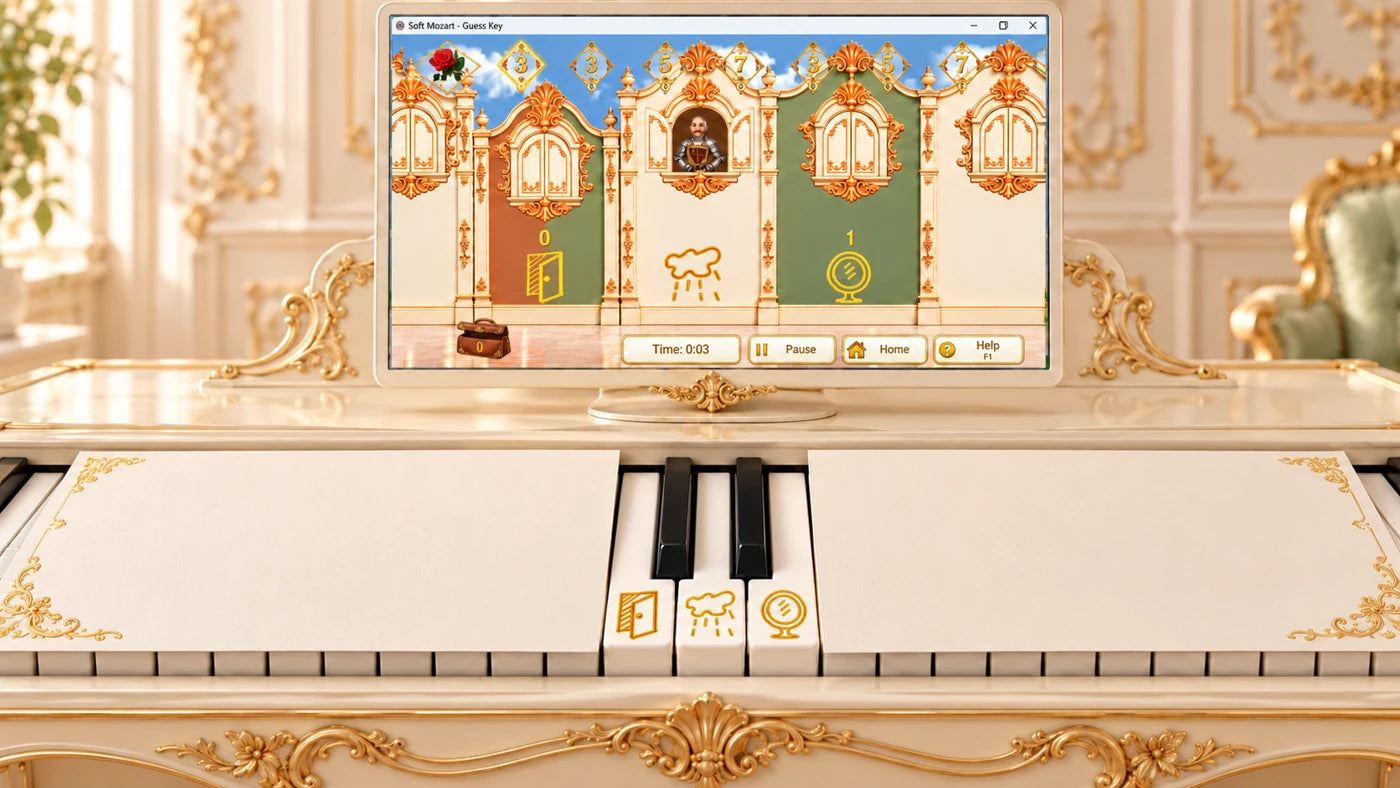
Choose Guess Key in the demo.
If there are too many keys
Visually narrow the keyboard by covering the part not yet needed with paper or cardboard, leaving a few relevant keys visible. The illustration leaves Do, Re, and Mi uncovered. The covering must not press the keys or restrict their movement. Uncover more keys as needed.
What to notice
Your child notices a familiar symbol, looks towards the keyboard, finds a key, and presses it independently. What matters is the connection between what they see, hear, and do.
After the game
If you chose My Learning, check the result in My results. You can record the date and the points your child earned independently in a learning diary.
What not to do
Do not guide your child’s hands, press keys for them, or demand a certain score. If they ask for help, point to a familiar symbol or remind them of its name, leaving the key press to your child.
3. Fine motor skills and coordination
Print the hands picture and invite your child to place their hands on it.
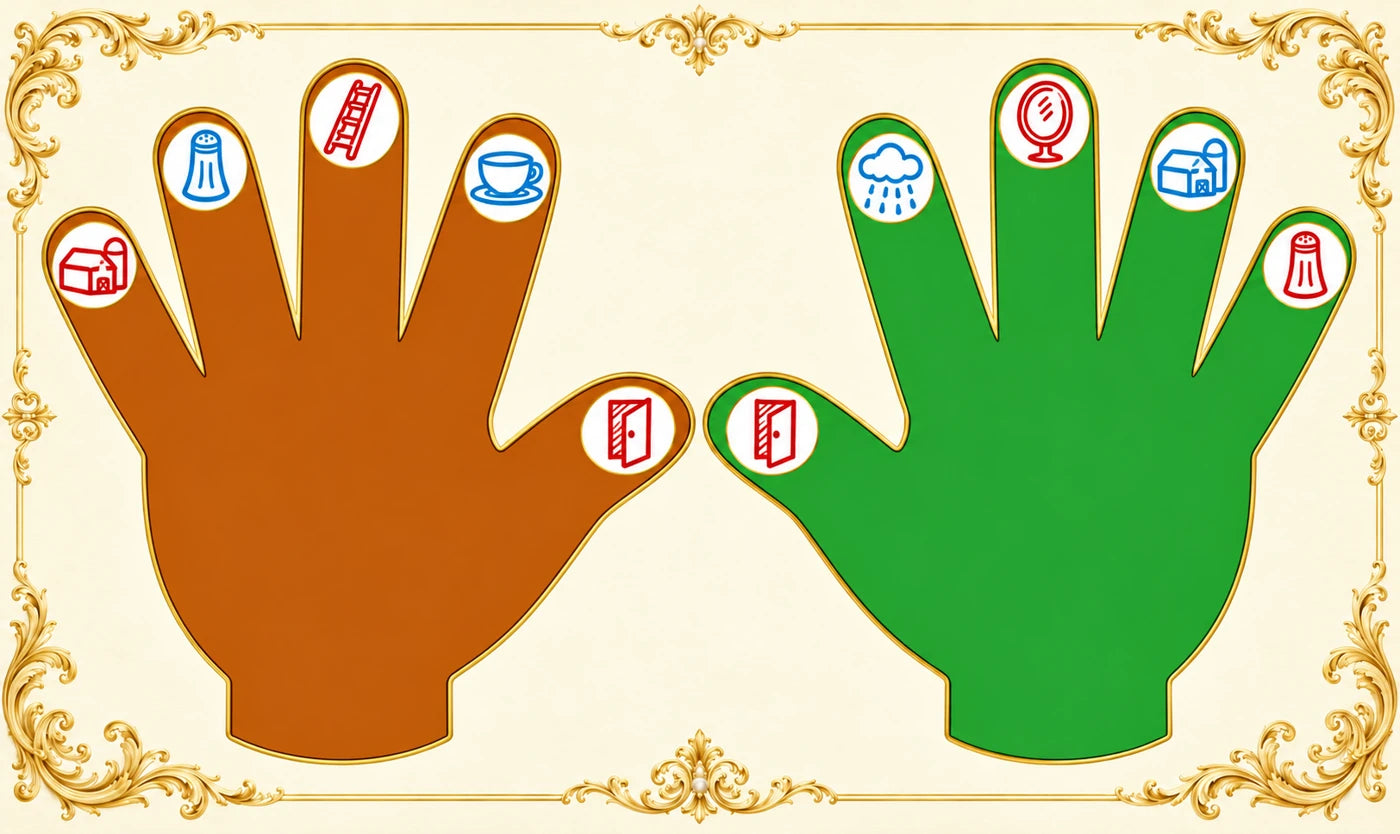
Getting to know the fingers
Print the hands picture. Place it in front of you and invite your child to match their hands to the drawing.
Why this matters
Each finger has a familiar note symbol. In this activity, the fingers have musical names.
Right hand, from thumb to little finger:
- Thumb — Do, Door.
- Index finger — Re, Rain.
- Middle finger — Mi, Mirror.
- Ring finger — Fa, Farm.
- Little finger — Sol, Salt.
Left hand, from thumb to little finger:
- Thumb — Do, Door.
- Index finger — Ti, Tea.
- Middle finger — La, Ladder.
- Ring finger — Sol, Salt.
- Little finger — Fa, Farm.
What to do
Show the movement on your own hand first: “This is my thumb — Do.” Lift and lower it. Then name the note and let your child try lifting the corresponding finger.
You can say or sing the note names. Begin with the fingers that interest your child and continue while they enjoy it.
If it is difficult at first
Show the movement again on your own hand. Allow time for an attempt. If neighboring fingers rise too, do not hold them down or demand immediate precision.
What to notice
Your child connects the name they hear, the symbol in the picture, and their own finger. They try to choose a movement and make it themselves.
What not to do
Do not expect your child to lift every finger separately or remember all the names immediately. Do not turn the activity into a test. Here we are exploring movement; playing a piece with all the fingers is not required now.

4. Music theory and ear training
Play the Song–Chant. Listen yourself and let your child join in.
Song–Chant and flashcards
The video could not start. Open the video separately.
Play the English Song–Chant starting on Do. Listen, sing along, and let your child join in. The song includes the complete sequence from Do to the next Do. This does not mean your child has to name or arrange all the notes immediately.
Prepare the red and blue cards. Move from familiar pictures to note names, gradually adding color recognition.
Step 1. Get to know the pictures
Show a card: “This is Door. Door is red.” Then introduce Rain and Mirror.
Lay out the cards and ask: “Give me Door,” “Give me Rain,” and “Give me Mirror.”
Use the full picture names at this stage. Your child does not need to choose by color yet.
Step 2. Notice the color
Once the pictures are familiar, put out the red and blue versions: “Give me the red Door,” “Give me the blue Door,” “Give me the red Rain,” and “Give me the blue Rain.”
Step 3. Get to know the note names
Connect each picture with its short musical name: “Door — Do,” “Rain — Re,” “Mirror — Mi.”
Now ask: “Give me Do,” “Give me Re,” and “Give me Mi.” Either color is fine at this stage.
Step 4. Combine note name and color
“Give me the red Do,” “Give me the blue Do,” “Give me the red Re,” and “Give me the blue Mi.”
Your child is now choosing a card using two features: its note name and its color.
Later: the complete note sequence
Gradually introduce the remaining pictures: Farm — Fa, Salt — Sol, Ladder — La, and Tea — Ti.
The next goal is to arrange the cards in order: Do — Re — Mi — Fa — Sol — La — Ti — Do. You will need two Door cards.
Lay out the cards and sing with the Song–Chant. For a child aged 2–3, the complete sequence is the result of gradual exploration, not a requirement for the first activity.
If it is difficult at first
Leave fewer cards in front of your child. Show and name a familiar picture yourself. Return to a step they understand, or put the cards away until they are interested again.
What to notice
Your child chooses a named picture, then distinguishes its color, recognizes the note name, and gradually combines these features. They may listen to your singing, try joining in, and return to familiar cards themselves.
What not to do
Do not begin by asking for the entire note sequence. Do not jump straight to “the red Do” while your child is still exploring Door and the colors. Do not require card selection, singing, and other actions all at the same time.
Choose the set that matches the letter used for Ti in your program: B or H. Both sets use the same solfège names, Do through Ti.
5. Playing the piano: Happy Birthday in Gentle Piano
First, open Gentle Piano under your own name and listen to Happy Birthday.
The adult goes first
In this section you prepare to support your child: learn the Gentle Piano controls, try the piece yourself, and learn how to select an amount your child can manage.
Select your own name for your practice. Open Gentle Piano and the complete Happy Birthday piece. The commands below use your computer keyboard. Play the music on your connected instrument.
Choose Gentle Piano in the demo.
Main controls
- F1 — open Help.
- S — listen to the piece.
- 1 — choose the first notation presentation.
- R (Right) — play the right-hand part while the program plays the other part.
- L (Left) — play the left-hand part while the program plays the other part.
- P (Pair) — play both parts.
- 1, 2, 3, 4, 5, 6 — switch between notation presentations.
Try this sequence
- Press S and listen to Happy Birthday.
- Choose presentation 1. Press R and play the right-hand part.
- Press L and play the left-hand part.
- Press P and try both parts.
- Explore presentations 1–6 to see how the notation changes. Then return to 1.
Watch the thermometer
Why this matters
Visual-Motor Delay (VMD) is the time needed to see the note symbol and respond by pressing a key. The program uses the thermometer to show this process.
During your own playing, aim for the thermometer to stay mostly green. If yellow or red predominates, repeat the part or select a shorter section. Give yourself time to become familiar with the task.
This is a measure of performance on a particular activity. Do not use it to judge your child’s abilities.
After playing, open My results to see how you did. Compare your attempts with your own earlier attempts, and your child’s attempts with their own earlier ones.
How to select a section
You are not changing or deleting the piece. You are choosing the part of it the program will use.
- Use the up/down arrow keys to move to the start of the section.
- Press Ctrl + Enter to mark the beginning.
- Move to the end boundary and press Ctrl + Backspace to mark the end.
- Choose R, L, or P and play the selected section.
- Press the space bar (Space) to cancel the selection and return to the whole piece.
For a section beginning at the start of the piece, you only need to set its end. If you are unsure which measures are included, press S to listen to the selection. F1 Help is available as a reminder.
Try playing with hidden notes
This introduces the adult to the software’s features. It is not a required activity for your toddler.
- Choose R, then press H to hide the right-hand notes.
- Choose L, then press H to hide the left-hand notes.
- Choose P, then press H to hide both parts.
- Press V to show the notes again.
Try these controls yourself first. For your child’s first attempts, make the notes visible again and return to presentation 1.
Your child’s turn
Select your child’s name if you are keeping their results.
The left-hand part, played with two index fingers
Open the whole Happy Birthday piece, choose presentation 1, and select L. Your child can play this part using the index finger of each hand.
This part uses the combinations B-flat and C, then F and C. Follow the notes in the program. Help your child find their way when they ask, while leaving the key presses to them.
Show the sequence: press a key, hold it until the butterfly appears, then release it. A short prompt is enough: “Hold… here’s the butterfly — let go.”
Later, your child can try using a thumb and index finger. There is no rush to make that change: for now, they are learning the action and its connection with the picture and sound.
The right-hand part
Choose R. Let your child try playing with their right hand. If the whole piece is difficult, select a section using the controls you have practiced. When playing becomes easier and your child wants to continue, extend the section or return to the whole piece.
Singing
You can name or sing the notes yourself. Let your child join in when they are comfortable. Do not expect them to find a key, hold it, watch the screen, and sing all at once.
If it is difficult
Shorten the section, return to a familiar part, or stop the attempt. Help when your child asks, while leaving the pressing, holding, and releasing of the keys to them.
What to notice
Your child looks at the note symbol, finds a key, hears the result of their own action, and tries to hold the sound and release the key at the right time. Notice which actions they can already do independently.
What not to do
Do not press keys for your child, hurry them, or demand the whole piece or both parts at once. Do not make the activity harder just to obtain a result on the screen.
6. Music culture and appreciation
Play your chosen recording and listen with your child.
A familiar song, performed by musicians
Your child has met Happy Birthday in Gentle Piano: heard it, tried playing it, or listened to you play. Now offer a chance to hear how other musicians perform it.
Why this matters
This connects your child’s own musical experience with the wider world of music.
What to do
Before listening, say: “This is Happy Birthday. We played it on our keys. Let’s listen to the musicians.”
Play your chosen recording and listen together. Singing, dancing, swaying, or “conducting” are welcome. If your child prefers to sit quietly and listen or watch, allow that too.
Name the piece and performers. Return to familiar music when your child is interested. Introduce other performances gradually.
Listen to Stravinsky
Igor Stravinsky based his Greeting Prelude on Happy Birthday. The familiar song takes an unusual form. Enjoy listening together without expecting your child to recognize the tune immediately.
Watch: Oslo Philharmonic, conducted by Vasily Petrenko.
Listen without YouTube: Columbia Symphony Orchestra, conducted by Igor Stravinsky. The complete 55-second recording is available on the publisher Boosey & Hawkes’ website.
These are two performances of the same work.
Find another performance
Find another performance of Happy Birthday online that you enjoy: on the piano, by an ensemble, or by an orchestra. Listen yourself first, then share it with your child.
Try searching for “Happy Birthday orchestra,” “Happy Birthday piano,” or “Heidrich Happy Birthday Variations.”
Follow your own curiosity: you are discovering music for yourself as well as for your child.
What to look for
Does your child listen more closely, smile, move with the music, join the melody, or ask to hear it again? These responses can help you notice what interests them.
What to avoid
Do not insist on sitting still, listening to the end, or recognizing the tune. Avoid turning listening into a test: “What is this? Do you remember?”
Continue learning with Soft Mozart
The next lessons will build on your child’s first musical discoveries: learning to read and sing notes, play pieces, and hear and understand music — at their own pace, with your involvement.
You can learn independently or with the support of our certified teachers, online or in person. On our forum, you can ask questions, share progress, and connect with other families and teachers.
We hold concerts and assessments and nominate participants for medals and diplomas. Those first attempts at home can be the beginning of a lifelong musical journey.
Join Soft Mozart — learn, share your discoveries, and grow with us!